A Webhook serves as a tool that enables one system to transmit real-time data to another when a specific event takes place. Think of it as an automated "smart notification" that delivers pertinent information without requiring manual verification.
If you don't have a URL, it's recommended to contact a developer for assistance.
If you already have a Webhook URL, you can set it up as follows:
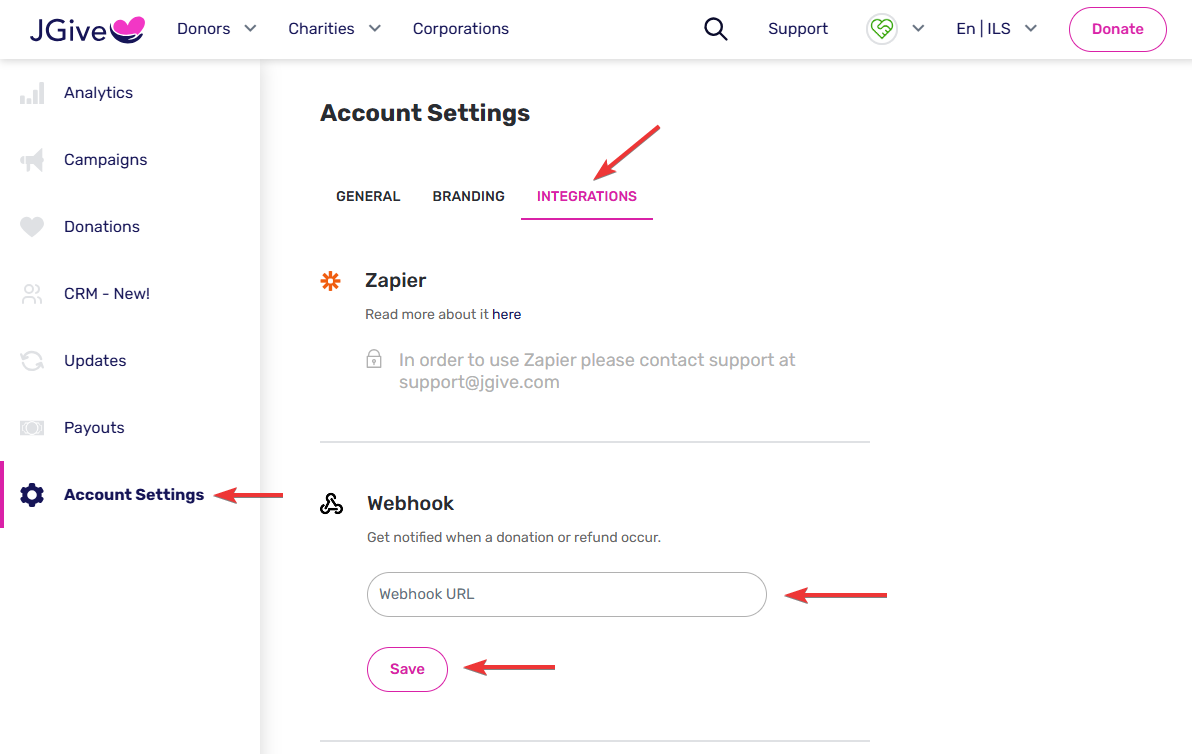
After logging into your charity's account, go to 'Account Settings'> 'Integrations', and enter your Webhook URL in the designated field. Finally, click 'Save'.
🧾 Donation Webhook Event - Field Descriptions
🔹 transfer – Payment transfer details
| Field |
Description |
| id |
Unique ID of the transfer |
| completed_at |
Timestamp when the transfer was completed |
| refunded_at |
Timestamp if the transfer was refunded |
| israeli_id |
Donor’s Israeli ID used in the transfer |
| israeli_id_source |
Source from which the Israeli ID was obtained |
| amount |
Transfer amount |
| currency |
Currency of the transfer amount |
🔹 donation – Metadata about the donation
| Field |
Description |
| donation_id |
Unique ID of the donation |
| created_at |
Timestamp when the donation was created |
| comment |
Optional comment left by the donor |
| share_donor_details_with_charities |
Whether donor agreed to share their details with charities |
| receive_updates_from_charities |
Whether donor agreed to receive updates from charities |
| purpose_he |
Purpose of the donation (Hebrew) |
| purpose_en |
Purpose of the donation (English) |
| checkout_locale |
Language used during the donation checkout |
| recurring |
Indicates if the donation is recurring |
| recurring_months |
Duration of the recurring donation in months |
| upcoming_transfer_count |
Number of remaining transfers (if recurring) |
| next_transfer_at |
Next scheduled transfer date (if recurring) |
| recurring_end_date |
End date of recurring donations |
| recurring_payment_number |
Current payment number in the recurring cycle |
| amount |
Donation amount |
| norm_amount |
Normalized donation amount |
| amount_currency |
Currency of the donation |
🔹 payment_method – Payment method used
| Field |
Description |
| provider |
Payment provider used (e.g., PayMe) |
| name |
Type of payment method (e.g., credit card) |
| card_last4 |
Last 4 digits of the card used |
| redirected |
Whether the user was redirected during payment |
🔹 invoice – Invoice details
| Field |
Description |
| id |
Unique ID of the invoice |
| number |
Invoice number issued |
| download_url |
URL to download the original invoice PDF |
| download_copy_url |
URL to download a copy of the invoice |
| tax_authority_confirmation_number |
Confirmation number from tax authority (if any) |
🔹 donor – Donor's personal information
| Field |
Description |
| email |
Donor's email address |
| phone_number |
Donor's phone number |
| israeli_id |
Donor's Israeli ID |
| first_name |
Donor’s first name |
| last_name |
Donor’s last name |
| full_name |
Donor’s full name |
🔹 invoice_information – Billing info for the invoice
| Field |
Description |
| recipient_name |
Name that appears on the invoice |
| company_id |
Company ID (if a business invoice) |
| address_1 |
First address line |
| address_2 |
Second address line (if applicable) |
🔹 donation_target – Recipient of the donation (e.g. participant, team, event)
| Field |
Description |
| id |
Unique ID of the donation target |
| name_he |
Target name in Hebrew |
| name_en |
Target name in English |
| to_charity_page |
Was the donation to a charity page? |
| to_main_event |
Was the donation to a main event? |
| to_team |
Was the donation to a team page? |
| team_id |
Associated team ID (if applicable) |
| main_event_id |
Associated main event ID |
🔹 participant – Participant related to the donation
| Field |
Description |
| id |
Unique ID of the participant |
| name_he |
Participant's name in Hebrew |
| name_en |
Participant's name in English |
| email |
Participant's email |
| phone_number |
Participant’s phone number |
| send_email_notification |
Whether to send an email notification |
| send_whatsapp_notification |
Whether to send a WhatsApp notification |
| team_id |
Team ID linked to the participant (if any) |
| main_event_id |
Main event the participant is part of |